SafeKit: High Availability Software for Windows and Linux, Without a SAN
SafeKit turns two standard servers into a SANless high availability cluster that keeps your applications running. It replicates your data in real time, restarts your application on the second server if the first one fails, and reintegrates the failed server automatically once it is repaired. You install it on the servers you already have, with no shared storage and no cluster expertise required.
Replication is synchronous, so no data is lost when a server fails, and your application is back in about a minute or less. Licences are perpetual and priced per server.
Start your 30-day free trial ›
What SafeKit Does
SafeKit combines four functions in a single product, managed from one web console or one command line, on Windows and Linux.
| Function | How it works |
|---|---|
| Real-time replication | Every change made to your files is copied to the second server as it happens, so a failure does not lose data. |
| Automatic failover | SafeKit detects the failure, moves the virtual IP address and restarts the application on the other server. |
| Automatic failback | The repaired server resynchronizes in the background while the application keeps running. |
| Load balancing | Network load balancing runs inside the servers, with no external load balancer or proxy. |
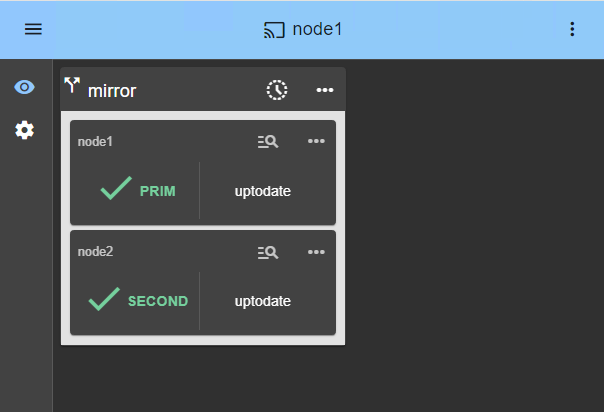
You do not need a SAN, a quorum disk, Active Directory, or enterprise editions of your operating system or database.
Explore the cluster architectures ›
Choose Your Protection Level
Application HA (mirror.safe, farm.safe and the application modules) replicates only your application data and restarts the application on the second server. It requires you to know which services to restart, which folders to replicate in real time, and which virtual IP address to fail over. It works on physical servers, in virtual machines on all hypervisors including VMware, Hyper-V and KVM, and in the cloud, and it gives the fastest recovery.
VM HA (hyperv.safe, kvm.safe) replicates and fails over the whole virtual machine, so you do not need to know how the application works. It suits environments with several applications spread across several VMs.
Compare Application HA and VM HA ›
Ready-Made Modules For Your Applications
Pre-configured modules are free and included with the product. Each one defines which services to restart and which folders to replicate for a given application.
- Databases: SQL Server, PostgreSQL, Oracle, MySQL, MariaDB, Firebird
- Web: Apache, IIS, NGINX
- VMs and containers: Hyper-V, KVM, Docker, Podman, Kubernetes (k3s)
- Cloud: AWS, Azure, GCP and other clouds
- Physical security and industry: Milestone XProtect, Genetec, Nedap, Bosch, Hanwha, Siemens
Browse all solutions and modules ›
Customer Use Cases
- Video management (VMS): keeps live and recorded video available during a server failure. Used with Milestone, Genetec and Hanwha.
- Access control (EACS): keeps credentials and alarms available at all times. Used with Hirsch Microsesame, Nedap AEOS and Siemens SiPass.
- SCADA and industry: keeps operators in control of production lines, for example Probat coffee roasters and ALSTEF baggage sorting machines.
- Building management (BMS): keeps HVAC, safety and energy systems running. Used with Siemens Desigo CC and Bosch BIS.
- Air traffic control (ATC): keeps controllers connected to critical airside applications, for example with ADB SafeGate.
- Metro operations control (OCC): keeps supervision available for automated, driverless Paris metro lines.
- Edge sites: turns two standard servers into an HA cluster where there is no data center.
- Software publishers (OEM): adds high availability to your catalog as a software-only option.
Simple, Predictable Pricing
SafeKit is sold with a perpetual licence, so there is no mandatory subscription. The price depends only on the number of servers, not on CPU cores or sockets, and all application modules are free. It also works with standard editions of Windows, Linux and your databases, so you do not pay for Enterprise editions.
Know The Limits Before You Start
SafeKit is built for simplicity, not for every case. It is a good fit for up to a few terabytes of replicated data, fewer than 1,000,000 files, up to 32 VMs when using VM HA, and two nodes on the same LAN or VLAN with low latency (typically under 5 ms round trip).
For larger volumes, shared storage or another approach is a better choice.
See the full list of limitations ›
SafeKit Video Library
🔍 Explore SafeKit
Find information about SafeKit features, architectures, videos, documentation, and the free trial.
| Resource | Description | Link |
|---|---|---|
| Key features | Learn why SafeKit is a simple and cost-effective high availability solution. | Discover the key features |
| Use cases | Learn how SafeKit keeps critical applications and infrastructure available. | Explore the use cases |
| Deployment model | SafeKit provides high availability without a SAN or shared storage. | Explore the deployment model |
| High availability strategies | Compare high availability for virtual machines with high availability for applications. | Compare the two strategies |
| Technical specifications | Check the technical requirements and limitations for SafeKit clusters. | Read the technical specifications |
| Videos | Watch demonstrations of SafeKit configuration and automatic failover. | Watch the technical videos |
| Architecture | Learn how the SafeKit Mirror cluster replicates files in real time and handles failover. | Explore the Mirror architecture |
| Architecture | Learn how the SafeKit Farm cluster balances network traffic and handles failover. | Explore the Farm architecture |
| Product comparison | Compare SafeKit with traditional high availability clusters. | Compare the solutions |
| Technical resources | Find technical documentation, download SafeKit, and access the free trial. | Access the documentation and free trial |
| Application modules | Use preconfigured SafeKit modules to set up high availability for your applications. | Explore the application modules |