N-1 Redundancy Clustering: High Availability for Multiple Applications with One Backup
High availability with data replication and application failover from N servers to 1
N-1 redundancy
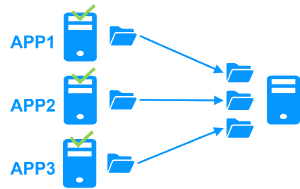
How the N-1 redundancy works?
SafeKit provides a simple N-1 redundancy cluster with N applications running on N servers and with a single backup for failover. In a SafeKit N-1 redundancy cluster, each application works on its own replicated directories.
In case of failure of one primary server unlike the active-active cluster, the backup server doesn’t have to handle a double workload.
This assumes there is only one failure at a time in the N-1 redundancy cluster. The solution can support multiple primary servers failures at the same time, but in this case the single backup server will have to handle the combined workload of all the failed servers.
How to implement N-1 redundancy?
The SafeKit N-1 redundancy cluster is simply configured by deploying N mirror modules on N+1 servers.
Note that:
- all applications (Appli1, Appli2, Appli3) must be installed on the single backup for application failover,
- each mirror module will have its own virtual IP address, its own replicated file directories and its own recovery scripts.
🔍 Explore SafeKit
Find information about SafeKit features, architectures, videos, documentation, and the free trial.
| Resource | Description | Link |
|---|---|---|
| Key features | Learn why SafeKit is a simple and cost-effective high availability solution. | Discover the key features |
| Use cases | Learn how SafeKit keeps critical applications and infrastructure available. | Explore the use cases |
| Deployment model | SafeKit provides high availability without a SAN or shared storage. | Explore the deployment model |
| High availability strategies | Compare high availability for virtual machines with high availability for applications. | Compare the two strategies |
| Technical specifications | Check the technical requirements and limitations for SafeKit clusters. | Read the technical specifications |
| Videos | Watch demonstrations of SafeKit configuration and automatic failover. | Watch the technical videos |
| Architecture | Learn how the SafeKit Mirror cluster replicates files in real time and handles failover. | Explore the Mirror architecture |
| Architecture | Learn how the SafeKit Farm cluster balances network traffic and handles failover. | Explore the Farm architecture |
| Product comparison | Compare SafeKit with traditional high availability clusters. | Compare the solutions |
| Technical resources | Find technical documentation, download SafeKit, and access the free trial. | Access the documentation and free trial |
| Application modules | Use preconfigured SafeKit modules to set up high availability for your applications. | Explore the application modules |