Alternative to SQL Server Always On: HA for Express and Standard Editions
Alternative to Always On SQL Server for express and standard editions
The solution for Microsoft SQL Server
SafeKit brings high availability to Microsoft SQL Server between two redundant nodes with synchronous real-time replication of data and automatic failover.
The solution is independent of the Microsoft SQL Server edition and works with express and standard editions.
A generic product
SafeKit is a generic product. You can replicate more than SQL server data and logs. If your application is SQL Server-based with specific folders containing your configuration or other files, you can replicate them in the same way. And you can restart your own services in addition to SQL server services.
SafeKit installation guide with Microsoft SQL Server express and standard editions
Without Microsoft failover cluster
SafeKit works without Microsoft failover cluster as with Always On SQL Server. It is an all-in-one offer that brings virtual IP address, synchronous real-time replication of folders, automatic failover and failback, and more… SafeKit eliminates the need for shared disks and database enterprise editions.
Without domain controller and active directory
SafeKit works without configuring domain controller and active directory as with Always On SQL Server. This easy-to-deploy, cost-effective solution does not require any specific skills.
Without 3 nodes for quorum
SafeKit works without the need for 3 nodes for quorum as with Always On SQL Server. In case of network isolation, SafeKit implements a split brain checker with a ping to a router playing the role of witness. Moreover, multiple heartbeats can be easily configured in the product.
Other redundancy and high availability solutions
With SafeKit, you can implement on Windows and Linux, real-time replication and failover of any folders and services, databases, complete Hyper-V or KVM virtual machines, Docker, Kubernetes, Cloud applications.
A complete solution
SafeKit solves:
- hardware failures (20% of problems), including the complete failure of a computer room,
- software failures (40% of problems), including restart of critical processes,
- and human errors (40% of problems) thanks to its ease of use and its web console.
How the SafeKit mirror cluster works with Microsoft SQL Server?
Step 1. Real-time replication
Server 1 (PRIM) runs the Microsoft SQL Server application. Clients are connected to a virtual IP address. SafeKit replicates in real time modifications made inside files through the network.
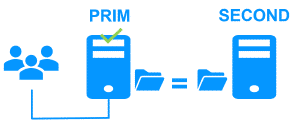
The replication is synchronous with no data loss on failure contrary to asynchronous replication.
You just have to configure the names of directories to replicate in SafeKit. There are no pre-requisites on disk organization. Directories may be located in the system disk.
Step 2. Automatic failover
When Server 1 fails, Server 2 takes over. SafeKit switches the virtual IP address and restarts the Microsoft SQL Server application automatically on Server 2.
The application finds the files replicated by SafeKit uptodate on Server 2. The application continues to run on Server 2 by locally modifying its files that are no longer replicated to Server 1.
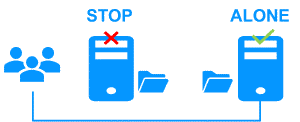
The failover time is equal to the fault-detection time (30 seconds by default) plus the application start-up time.
Step 3. Automatic failback
Failback involves restarting Server 1 after fixing the problem that caused it to fail.
SafeKit automatically resynchronizes the files, updating only the files modified on Server 2 while Server 1 was halted.
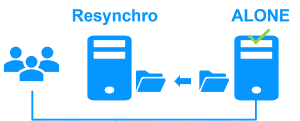
Failback takes place without disturbing the Microsoft SQL Server application, which can continue running on Server 2.
Step 4. Back to normal
After reintegration, the files are once again in mirror mode, as in step 1. The system is back in high-availability mode, with the Microsoft SQL Server application running on Server 2 and SafeKit replicating file updates to Server 1.
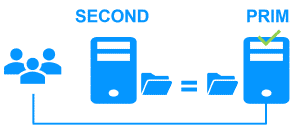
If the administrator wishes the application to run on Server 1, this can be done manually through the web console at an appropriate time, or automatically through configuration.
How to configure a SafeKit Mirror Cluster for Microsoft SQL Server?
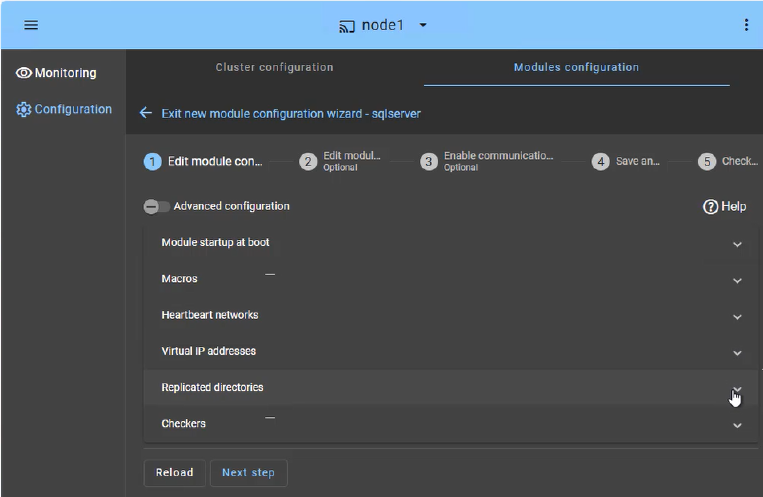
The SafeKit web console provides an intuitive interface to orchestrate high availability for your critical applications. In just a few steps, you can configure a SafeKit mirror cluster to ensure business continuity:
- Application Failover (Macros Tab): Define the specific application services to be automatically restarted in the event of a failure.
- Heartbeat network(s): Dedicated communication path(s) used by cluster nodes to continuously monitor each other’s health and availability and synchronize failover decisions.
- Virtual IP Management: Set up the Virtual IP (VIP) for transparent client reconnection after a failover.
- Real-Time Replication: Select the critical directories for host-based, synchronous byte-level replication.
- Checkers: Monitor the application’s health and trigger automatic recovery if a process failure is detected.
The SafeKit cluster includes a dedicated split-brain checker to resolve network isolation issues without the need for a third witness machine or an additional heartbeat network. Learn more about heartbeat, failover and quorum in a cluster.
How to monitor a SafeKit mirror cluster for Microsoft SQL Server?
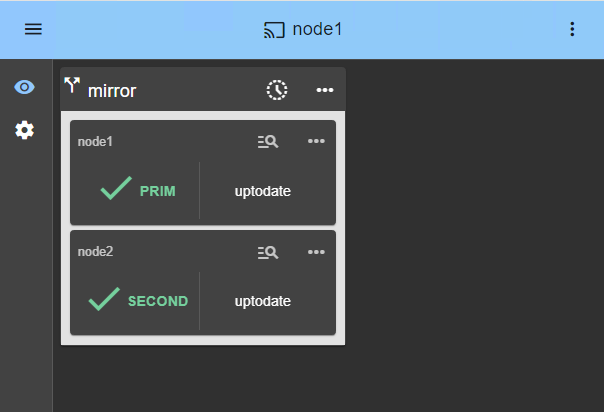
The SafeKit management console offers a unified view of your high availability infrastructure. It allows administrators to monitor the operational state of the cluster and track data synchronization in real-time.
For a 2-node mirror cluster, the console clearly displays the roles of each server:
- PRIM (Primary): The active node currently running the application and managing the Virtual IP. It performs writes to the local storage and real-time replication to the secondary node.
- SECOND (Secondary): The standby node receiving synchronous byte-level updates. It is ready to take over instantly if the Primary fails.
- ALONE State: Visually alerts you when the cluster is running on a single node (e.g., during maintenance or after a failure), indicating that redundancy is temporarily lost.
- Resynchronization Progress: When a failed node recovers, its status turns orange during background data reintegration, ensuring no downtime during the “return to normal” phase.
Beyond simple status icons, the interface provides one-click failover orchestration , allowing you to manually reassign the primary role for planned maintenance while ensuring continuous availability for user activity.
Video Guide: Configuring a SafeKit HA mirror cluster for SQL Server
SafeKit Video: Application-Level Clustering (8:47)
In this video, discover how SafeKit implements a mirror HA cluster without the complexity of a SAN. While this demonstration uses Microsoft SQL Server, the solution works identically for other databases and applications.
Chapters
- 🎬 2 nodes with SQL Server (0:32)
- 🎬 Configure the cluster and the mirror.safe module (3:58)
- 🎬 Start and test SQL replication, migration, failover on crash (4:17)
Step-by-Step Implementation
- 🛠️ Read the guide on setting up a mirror cluster on Windows
- 🛠️ Read the guide on setting up a mirror cluster on Linux
🔍 Explore SafeKit
Find information about SafeKit features, architectures, videos, documentation, and the free trial.
| Resource | Description | Link |
|---|---|---|
| Key features | Learn why SafeKit is a simple and cost-effective high availability solution. | Discover the key features |
| Use cases | Learn how SafeKit keeps critical applications and infrastructure available. | Explore the use cases |
| Deployment model | SafeKit provides high availability without a SAN or shared storage. | Explore the deployment model |
| High availability strategies | Compare high availability for virtual machines with high availability for applications. | Compare the two strategies |
| Technical specifications | Check the technical requirements and limitations for SafeKit clusters. | Read the technical specifications |
| Videos | Watch demonstrations of SafeKit configuration and automatic failover. | Watch the technical videos |
| Architecture | Learn how the SafeKit Mirror cluster replicates files in real time and handles failover. | Explore the Mirror architecture |
| Architecture | Learn how the SafeKit Farm cluster balances network traffic and handles failover. | Explore the Farm architecture |
| Product comparison | Compare SafeKit with traditional high availability clusters. | Compare the solutions |
| Technical resources | Find technical documentation, download SafeKit, and access the free trial. | Access the documentation and free trial |
| Application modules | Use preconfigured SafeKit modules to set up high availability for your applications. | Explore the application modules |