---
title: "How does a virtual IP address work in a high availability cluster?"
canonical: "https://safekit.eviden.com/best-practises/how-a-virtual-ip-address-works/"
description: "How SafeKit moves a virtual IP on failover: gratuitous ARP in the same subnet, load balancer, cloud CLI or BGP across subnets. Why a local virtual IP matters."
category: "best-practises"
lang: "en"
topics: "What is a virtual IP address in a high availability cluster?, Virtual IP implementation in SafeKit, How a virtual IP works in the same subnet (mirror cluster), How a virtual IP works across different subnets with a load balancer (mirror cluster), How a virtual IP works across different subnets with cloud provider CLIs (mirror cluster), How a virtual IP works across different subnets with BGP (mirror cluster), How DNS redirection works across different subnets (mirror cluster), How virtual IP load balancing works in a farm cluster on the same subnet, How a load balanced virtual IP works across different subnets (farm cluster), Comparison: virtual IP implementation, latency, and application transparency, Frequently asked questions on virtual IP"
---
# How does a virtual IP address work in a high availability cluster? {#how-a-virtual-ip-address-vip-works-in-high-availability-clustering}
## What is a virtual IP address in a high availability cluster? {#virtual-ip-definition}
A **virtual IP address** is the single address that clients use to connect to an application in a [high availability cluster](). The virtual IP is not linked to one server. On failover, it moves to the server that runs the application. Clients do not need to change their configuration.
**Key principle in SafeKit:** the virtual IP is **configured locally on the server** that runs the application. The application starts on the virtual IP, and it receives the original client IP. This is why many applications work correctly with SafeKit without any change. SafeKit provides two types of virtual IP:
* **Primary/secondary virtual IP with a mirror cluster:** the virtual IP is active only on the primary server. On failover, it moves to the secondary server.
* **Network load balancing virtual IP with a farm cluster:** the virtual IP is active on all the servers at the same time. The traffic is shared between them.
## Virtual IP implementation in SafeKit {#safekit-virtual-ip-implementation}
This article explains how SafeKit moves the virtual IP in each network architecture:
* **Same subnet or stretched VLAN ([mirror](#virtual-ip-same-subnet-failover) and [farm](#virtual-ip-load-balancing-same-subnet) clusters):** SafeKit configures the virtual IP on the server and sends a **gratuitous ARP (GARP)**. No external hardware is needed. This is the most transparent solution (everything is implemented by the SafeKit product).
* **Different subnets with a load balancer ([mirror](#virtual-ip-different-subnets-failover) and [farm](#virtual-ip-load-balancing-different-subnets) clusters):** the load balancer uses the SafeKit **health check** to send traffic to the right server (the load balancer is configured by the integrator).
* **[Different subnets with cloud provider CLIs](#virtual-ip-cloud-cli-failover) (mirror cluster):** the SafeKit `start_prim` script calls the cloud CLI to move the virtual IP (script written by the integrator).
* **[Different subnets with BGP](#virtual-ip-bgp-failover) (mirror cluster):** the primary server announces the virtual IP to the routers (script written by the integrator).
* **[Different subnets with DNS redirection](#virtual-ip-vs-dns-redirection-failover) (mirror cluster):** the SafeKit `start_prim` script changes the DNS record of the virtual name to the physical IP of the new primary server (script written by the integrator). There is no single virtual IP, and this method is not reliable for all clients.
Also in this article:
* [Comparison: virtual IP implementation, latency, and application transparency](#virtual-ip-methods-comparison)
* [Frequently asked questions on virtual IP](#virtual-ip-faq)
* [🔍 Explore SafeKit](#hub)

**Virtual IP implementation for mirror and farm clusters in SafeKit.**
## How a virtual IP works in the same subnet (mirror cluster) {#virtual-ip-same-subnet-failover}
- [Testing the primary/secondary virtual IP in a SafeKit mirror cluster](https://safekit.eviden.com/best-practises/test-primary-backup-vip-mirror/)
### Automatic failover and network rerouting in a local subnet {#automated-failover--network-rerouting-in-a-local-subnet}
In a local network, **SafeKit** manages the virtual IP and the application failover automatically.
### Local mirror cluster: 2-node failover on Windows or Linux {#local-mirror-cluster-seamless-2-node-windows-or-linux-failover}

In a **SafeKit mirror cluster**, the two nodes are in the same subnet. High availability uses a **virtual IP**. SafeKit manages the virtual IP in the network stack of the operating system. No special hardware is required. The virtual IP is added to the physical IP addresses of Server 1 and Server 2 with **IP aliasing**. Clients always connect to the virtual IP.
#### IP aliasing and multiple virtual IPs in SafeKit {#safekits-advanced-ip-aliasing--multiple-virtual-ip-support}
The virtual IP is a third IP address that moves between the nodes. SafeKit can manage **several virtual IPs** in one cluster. You can put them on the same network card or on different network cards. In this way, each service can use its own virtual IP.
#### The failover mechanism: gratuitous ARP (GARP) {#the-failover-mechanism-gratuitous-arp-garp}
Failover does not require any manual action. In normal operation, the virtual IP is linked to the **MAC address of Server 1 (mac1)**. If Server 1 fails, SafeKit does three things:
* **Virtual IP aliasing:** SafeKit configures the virtual IP as an alias on the network card of Server 2, the new primary server. The operating system then sends messages on the network to announce the virtual IP.
* **GARP:** SafeKit also sends **gratuitous ARP (GARP)** messages. Network switches and clients update their ARP cache. The virtual IP is now linked to the **MAC address of Server 2 (mac2)**.
* **Application recovery:** SafeKit restarts the application services on Server 2.
#### Remote data centers and stretched VLANs {#remote-data-centers--extended-vlans}
The **same-subnet solution described above** also works for **disaster recovery** between remote sites. It is often the best choice when the sites are connected by a **stretched VLAN** (extended LAN). Both sites are in one subnet. The network is simpler, and you do not need complex routing protocols.
> **⚠️ Note:** Rerouting at layer 2 with gratuitous ARP is the **most transparent solution** for applications. The application receives the original client IP, and the virtual IP is configured locally. Many applications **need a local virtual IP**. Without it, these applications **may not work correctly**. In this same-subnet setup, SafeKit implements the entire mechanism, so no special integration work is required.
## How a virtual IP works across different subnets with a load balancer (mirror cluster) {#virtual-ip-different-subnets-failover}
### Load balancer with SafeKit health checks {#cloud-ready-traffic-orchestration-via-load-balancer-integration}
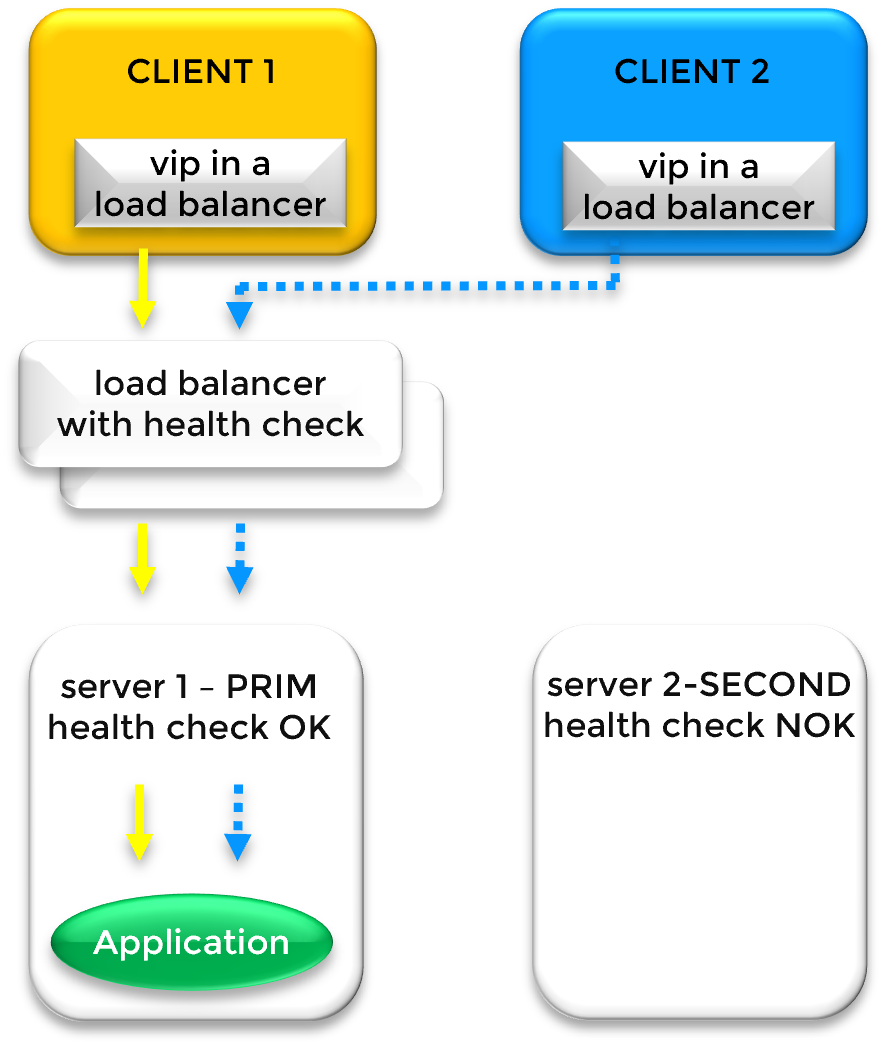
When the nodes are in **different subnets**, gratuitous ARP cannot move the virtual IP. In this case, the virtual IP is on a **load balancer**. The load balancer sends traffic to the primary server.
SafeKit provides a **health check URL** on each node:
* **Primary (PRIM):** returns `HTTP 200 OK`. The load balancer sends traffic to this node.
* **Secondary (SECOND):** returns `HTTP 404 NOT FOUND`. The load balancer sends no traffic to this node.
On failover, SafeKit changes the responses, and the load balancer sends traffic to the new primary server. This is the standard solution between **availability zones** on [**AWS**](), [**Azure**]() and [**Google Cloud**]().
> **⚠️ Note:** SafeKit provides the health check. Your network or your cloud provider provides the load balancer.
### The problem: the load balancer owns the virtual IP {#the-load-balancer-pitfall-virtual-ip-on-the-frontend-nat-to-the-physical-ip}
With a load balancer only, clients connect to the virtual IP. The load balancer translates the virtual IP (NAT) to the **physical IP** of the primary server. The client uses the virtual IP, but the server uses its physical IP. The server does not see the virtual IP.
### Keep the virtual IP configured locally on the primary server {#why-the-virtual-ip-must-stay-configured-locally-on-the-primary-server}
Some applications use the virtual IP as their server address. They work correctly only if the virtual IP is also **configured locally on the primary server**. Then:
* the services can start on the virtual IP;
* the server can reach its own services with the virtual IP;
* authentication works with the virtual IP.
With SafeKit, you can configure the virtual IP locally on the primary server. The method depends on the subnet of the virtual IP:
* **The virtual IP is in the same subnet as the physical IP addresses of the servers:** keep the `` section in the SafeKit module. SafeKit automatically configures the virtual IP as an alias on the network card of the physical IP address.
* **The virtual IP is in a different subnet:** keep the `` section in the SafeKit module, with a specific configuration. The example below shows this configuration on Azure.
* **Other option for a different subnet:** use the `start_prim` script to configure the virtual IP on a dedicated interface, such as the loopback interface, before the application starts. Use the `stop_prim` script to remove the virtual IP after the application stops. The integrator writes these commands. They are not provided by the SafeKit product.
**Note:** Some load balancers can keep the virtual IP as the destination address (for example, Floating IP or Direct Server Return).
### Example: Azure load balancer with a local virtual IP (Milestone XProtect) {#azure-load-balancer-local-virtual-ip-example}
This architecture is used in production on Azure for the **Milestone XProtect management server**, with the SafeKit `videoos` module. The two nodes are in two availability zones. The virtual IP is the frontend IP of the load balancer. This frontend IP is in a dedicated subnet.
**On the Azure side** (configured by the infrastructure team):
1. Create a **layer 4 load balancer** with a frontend IP in a dedicated subnet.
2. Add the two SafeKit nodes to the **backend pool** of the load balancer.
3. Add a **health probe** on the SafeKit health check URL of the module: path `/var/modules/videoos/ready.txt`, port `9010` (HTTP) or port `9453` (HTTPS with valid certificates). For another module, replace `videoos` with the module name.
4. Add **load balancing rules** for all the ports that clients use on the virtual IP: the ports of the Milestone management services and, if required, the ports of other services.
**On the SafeKit side:** in the `userconfig.xml` file of the module (`videoos/conf/userconfig.xml`), replace the standard `` section with this section:
```xml
```
Replace `VM_INTERFACE_NAME` with the name of the network interface of the VM, `LB_FRONTEND_IP` with the frontend IP of the load balancer and `LB_FRONTEND_NETMASK` with the netmask of the frontend subnet. The network interface must have the same name on both nodes. For more information, see the User's Guide, section 13.6.4 "[`` syntax](https://safekit.eviden.com/resources/safekit-user-guide-82/#_%3Cvip%3E_Syntax)".
**On the application side:** configure all the Milestone services to use the virtual IP, not the private IP address of the server.
> **⚠️ Note:** Use a frontend subnet that **does not overlap** with the subnet of the VMs. For example, VMs in `10.0.1.0/24` and load balancer frontend IP in `10.0.2.0/24`. SafeKit adds the frontend IP with its netmask on the network interface of the VM. If the two subnets overlap, this alias changes the routing of the VM and the network traffic of the VMs can fail.
## How a virtual IP works across different subnets with cloud provider CLIs (mirror cluster) {#virtual-ip-cloud-cli-failover}
### Why gratuitous ARP does not work in the cloud {#why-gratuitous-arp-does-not-work-in-public-clouds}
Cloud networks (AWS, Azure, Google Cloud) **ignore gratuitous ARP**. They send traffic only to IP addresses that are assigned in the cloud platform. SafeKit configures the virtual IP on the primary server, but the cloud network does not send the virtual IP traffic to this server.
### Moving the virtual IP with the cloud CLI {#moving-the-virtual-ip-through-the-cloud-api-in-safekit-failover-scripts}
Without a load balancer, the cloud provider CLI can be integrated into the SafeKit **`start_prim` script** to update the cloud network configuration before the application starts. The CLI can assign the virtual IP to the node becoming primary or update the cloud route to direct virtual IP traffic to that node.
The **virtual IP stays local** on the primary server. There is **no NAT**, and the original client IP does not change.
### Constraints {#constraints-of-the-cli-approach}
* The cloud CLI must be installed on both nodes. Each node needs a cloud identity with network rights.
* The script must manage errors and retries.
* Failover is **much slower** than with a load balancer and a health probe, because each failover waits for the response of the cloud API.
> **⚠️ Note:** The **integrator** must add the cloud CLI commands to the `start_prim` script. These commands are **not provided by the SafeKit product**. They depend on the cloud provider, the network design and the security rules of the customer. Validate the solution with your network team before production.
## How a virtual IP works across different subnets with BGP (mirror cluster) {#virtual-ip-bgp-failover}
### Virtual IP rerouting with BGP {#layer-3-virtual-ip-rerouting-with-bgp-route-advertisement}
With BGP (Border Gateway Protocol), the virtual IP is typically configured on a loopback interface of the primary server by the `start_prim` script before the application starts. The primary server announces the virtual IP to the routers as a /32 route.
On failover, the `stop_prim` script on the old primary server stops the application, removes the virtual IP from the loopback interface and withdraws the /32 route from the routers. If the old primary server crashes, `stop_prim` does not run, but the routers lose the BGP session and remove the route automatically.
### Benefits and prerequisites {#benefits-and-prerequisites}
* **The virtual IP stays local, there is no NAT, and the client IP does not change.**
* It works across subnets and sites. You do not need a stretched VLAN.
* You need BGP routers and help from your network team. In the cloud, you need a route server service from the cloud provider.
> **⚠️ Note:** BGP integration uses SafeKit scripts and your routing infrastructure. The **integrator** must write the commands in `start_prim` and `stop_prim` scripts. These scripts are **not provided by the SafeKit product**. Validate the solution with your network team before production.
## How DNS redirection works across different subnets (mirror cluster) {#virtual-ip-vs-dns-redirection-failover}
### DNS rerouting with the `start_prim` script {#dns-rerouting-with-the-start-prim-script}
With DNS redirection, there is **no single virtual IP**. Clients connect to a **virtual name** (the DNS name). On failover, the `start_prim` script on the new primary server starts the application, then changes the DNS record of the virtual name to the **physical IP** of the new primary server.
The `stop_prim` script does not need to do anything. If the old primary server crashes, the new primary server overwrites the DNS record.
### Example: DNS resolution and clients that keep the old IP {#the-technical-scenario-dns-resolution-and-the-stuck-client}
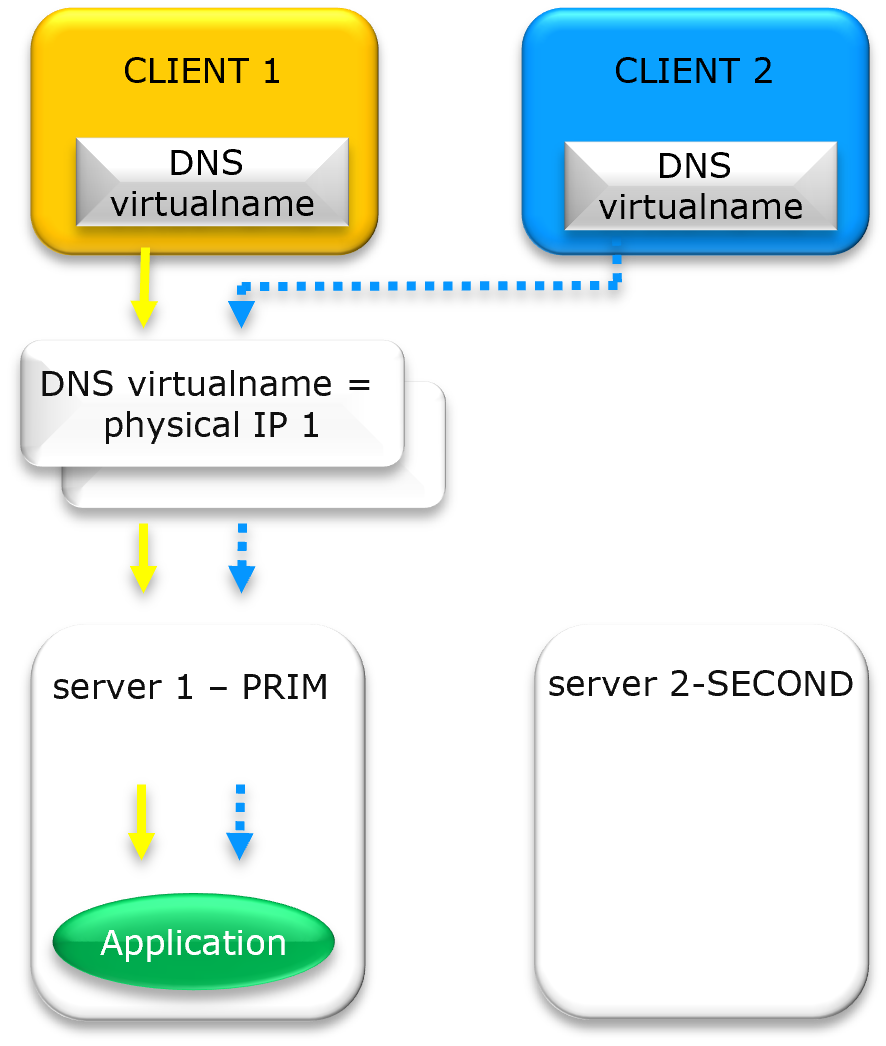
DNS resolution: clients still connected to physical IP 1 in a high availability cluster
#### Before failover: the name points to physical IP 1 {#current-state-resolution-to-physical-ip-1}
**Client 1** and **Client 2** ask the DNS system for the IP address of the virtual name. The DNS system returns **physical IP 1**. The clients then open a network connection to this address.
#### After failover: the name points to physical IP 2 {#the-failover-challenge-rerouting-to-physical-ip-2}
Server 1 fails. The `start_prim` script on Server 2 changes the DNS record to **physical IP 2**. The clients connect to physical IP 2 only if all these conditions are true:
* The **TTL (Time to Live)** is expired on all DNS servers between the client and the DNS record.
* The local DNS cache of Client 1 and Client 2 is empty.
* The application closes its connection and does a *new* DNS lookup.
If one condition is false, **Client 1 and Client 2** keep using physical IP 1. The service is down, even if the DNS record is correct.
### Limits and prerequisites {#the-two-black-boxes-of-dns-redirection}
* **DNS cache:** Many Internet service providers and company DNS servers ignore short TTL values. They can keep the old physical IP 1 for minutes or hours.
* **Application behavior:** Many applications (for example, Java services or web browsers) do a DNS lookup only once, when they start. They keep using the first IP address.
* **The IP address changes on each failover:** the application does not have a local virtual IP that stays the same. Applications that register their own IP address may not work.
* **Prerequisites:** a short TTL on the DNS record (for example, 30 to 60 seconds), and rights to update the DNS zone from both servers.
> **⚠️ Note:** The **integrator** must write the DNS update commands in the `start_prim` script. These commands are **not provided by the SafeKit product**. They depend on the DNS server (Windows DNS, BIND or cloud DNS).
### Conclusion {#conclusion}
DNS redirection is not a reliable high availability solution. Use it only if all clients do a new DNS lookup when they reconnect. For immediate and transparent failover, use a **virtual IP**: with a stretched VLAN, with a load balancer, with cloud provider CLIs or with BGP.
## How virtual IP load balancing works in a farm cluster on the same subnet {#virtual-ip-load-balancing-same-subnet}
- [Testing the load balancing virtual IP in a SafeKit farm cluster](https://safekit.eviden.com/best-practises/test-load-balancing-vip-farm/)
### Kernel-level load balancing and redundancy {#scalable-performance-kernel-level-load-balancing--redundancy}
When there is a lot of traffic, SafeKit can share the work between several active servers. If one server fails, the other servers continue to work.
### Farm cluster architecture: load balancing between Windows or Linux nodes {#farm-cluster-architecture-load-balancing-across-windows-or-linux-nodes}
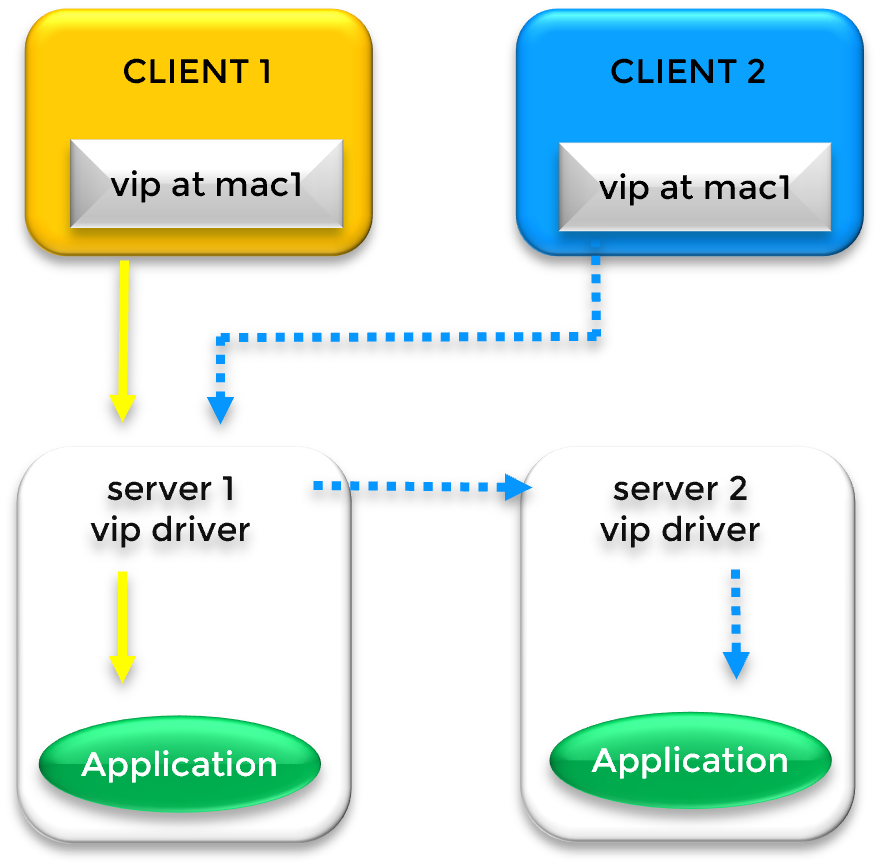
In a **load balancing farm cluster**, clients connect to a virtual IP, and the requests are shared between several servers at the same time. This example shows two nodes. You can add more nodes to the cluster. In the same subnet, the virtual IP is configured with IP aliasing on the network card of **every server** in the cluster.
#### Traffic sharing: the kernel filter {#traffic-distribution-the-kernel-level-filter}
In a farm cluster, a SafeKit **filter in the kernel** shares the traffic. It works like this:
* **ARP mapping:** In the ARP cache of the clients, the virtual IP is linked to one MAC address (for example, `mac1` of Server 1).
* **Packet analysis:** Server 1 receives the packets. The SafeKit kernel filter reads the **client IP** or the **TCP port** of each packet.
* **Load sharing:** The filter decides which packets Server 1 processes and which packets go to the other nodes (for example, Server 2). To send a packet to another node, the filter rewrites the **destination MAC address** of the packet with the MAC address of this node. The destination IP address stays the virtual IP. The work is shared between the servers.
#### Failover and rerouting with gratuitous ARP {#failover-and-rerouting-with-gratuitous-arp}
If Server 1 fails, SafeKit sends a **gratuitous ARP (GARP)** message. The clients update their ARP cache with `mac2` of Server 2. The clients are then sent immediately to the other nodes of the farm.
#### Deployment in remote sites {#deployment-in-remote-sites}
This load balancing solution also works between **remote data centers**, if the sites are connected by a **stretched VLAN**. All sites are then in the same subnet. This is the most efficient configuration for farm clusters on several sites.
### SafeKit Video: Network Load Balancing and Virtual IP Management (5:03) {#demo-farm}
In this video, learn how to implement a **virtual IP address** to provide a single entry point for a 2-node cluster. SafeKit simplifies **network load balancing** by automatically managing the virtual IP, ensuring that client traffic is distributed across nodes and redirected instantly during a failover. Although this demonstration uses Apache on Windows, the solution works identically with other applications.
### Chapters {#chapters}
1. 🎬 [Architecture: Preparing 2 nodes for a shared Virtual IP](https://www.youtube.com/watch?v=1Ww2-cXHNx4&t=0s) (0:13)
2. 🎬 [Configuration: Setting up the farm.safe module and Virtual IP address](https://www.youtube.com/watch?v=1Ww2-cXHNx4&t=13s) (2:20)
3. 🎬 [Validation: Failover testing and Virtual IP redirection on server crash](https://www.youtube.com/watch?v=1Ww2-cXHNx4&t=153s) (2:30)
### Step-by-Step Implementation {#step-by-step-implementation}
* 🛠️ [Read the guide on setting up a farm.safe cluster on Windows](https://safekit.eviden.com/quick-install/safekit-quick-installation-guide-for-a-new-windows-application-with-network-load-balancing-and-failover/)
* 🛠️ [Read the guide on setting up a farm.safe cluster on Linux](https://safekit.eviden.com/quick-install/safekit-quick-installation-guide-for-a-new-linux-application-with-network-load-balancing-and-failover/)
## How a load balanced virtual IP works across different subnets (farm cluster) {#virtual-ip-load-balancing-different-subnets}
### Traffic across cloud subnets {#multi-zone-scaling-orchestrating-traffic-across-cloud-subnets}
A farm cluster can share the application work between several availability zones and subnets.
### Cross-subnet farm clusters: several Windows or Linux nodes {#cross-subnet-farm-clusters-multi-node-windows--linux-scalability}

When the farm nodes are in **different subnets** (for example, in several cloud availability zones), the **virtual IP** is on an external **load balancer**. The load balancer sends the traffic to the physical IP addresses of the servers in each subnet.
#### Traffic routing and load balancing rules {#intelligent-traffic-routing--load-balancing-rules}
The load balancer shares the client requests with two criteria:
* **Load balancing rules:** for example, the **client IP address** or the **client TCP port**.
* **Node availability:** the load balancer sends traffic only to the nodes that are healthy, based on the SafeKit health check.
> **⚠️ Note:** SafeKit provides the health check. Your network or your cloud provider provides the load balancer.
#### SafeKit health check {#safekit-health-check-mechanism}
SafeKit provides a **health check URL** on every server of the farm. The load balancer reads it to know the status of each server:
* **Node UP:** the health check returns `HTTP 200 OK`. The load balancer sends traffic to this server.
* **Node DOWN:** if a server or an application fails, SafeKit returns `HTTP 404 NOT FOUND` (or the server does not answer). The load balancer stops sending traffic to this node immediately.
#### Cloud deployment: AWS, Azure, and GCP {#cloud-deployment-standards-aws-azure-and-gcp}
This is the standard architecture for **farm clusters in the cloud**. If a subnet or a zone stops, the other nodes continue to process the traffic. It is supported on [**Amazon AWS**]() (AWS Network Load Balancer), [**Microsoft Azure**]() (Azure Load Balancer) and [**Google Cloud (GCP)**]() (Google Cloud Load Balancing).
## Comparison: virtual IP implementation, latency, and application transparency {#virtual-ip-methods-comparison}
**Comparison of virtual IP redirection methods and DNS redirection for high availability and disaster recovery.**
Environment and use case | High availability type | Redirection method | Implemented by | Network latency | Application transparency and local IP
---|---|---|---|---|---
Primary/secondary (high availability) | Mirror cluster | Gratuitous ARP (MAC address takeover) | ✅ SafeKit product | Very low: time to detect the failure and send the GARP | Full transparency: the virtual IP is local on the active node. The client IP does not change.
Load balancing (active/active) | Farm cluster | Kernel network filter / GARP | ✅ SafeKit product | Very low: time to detect the failure and change the network filters | Full transparency: the virtual IP is local on all nodes. The client IP does not change.
Same subnet / stretched VLAN | Disaster recovery (remote data centers) | IP aliasing / GARP | ✅ SafeKit product (the stretched VLAN is provided by the network team) | Low: depends on the round trip time (RTT) of the stretched VLAN | Full transparency: the virtual IP is local on the nodes. The client IP does not change.
Different subnets: load balancer only | Disaster recovery (remote data centers / cloud) | External load balancer | 🛠️ Integrator: load balancer configuration (SafeKit provides the health check) | Medium: depends on the health check interval of the load balancer | ⚠️ Partial transparency if SNAT/DNAT is used. The virtual IP is **NOT** local on the nodes. The client IP may **NOT** be kept. The application must support this.
Different subnets: load balancer + local SafeKit virtual IP | Disaster recovery (remote data centers / cloud) | External load balancer with Floating IP / Direct Server Return, or frontend IP as a local SafeKit alias | 🛠️ Integrator: load balancer configuration (SafeKit provides the health check) | Medium: depends on the health check interval of the load balancer | Good transparency: the virtual IP is local on the primary node and is the destination address.
Different subnets: cloud CLI | Disaster recovery (cloud) | Cloud API: the private IP or a cloud route moves to the new primary node | 🛠️ Integrator: cloud CLI commands in the `start_prim` script | Medium to high: depends on the response time of the cloud API | Full transparency: the virtual IP is local on the primary node. The client IP does not change.
Different subnets: BGP | Disaster recovery (remote data centers / cloud) | /32 route announced with BGP | 🛠️ Integrator: BGP commands in the `start_prim` and `stop_prim` scripts | Low to medium: depends on the BGP convergence time | Full transparency: the virtual IP is local on the primary node. The client IP does not change. Requires BGP routers.
DNS redirection: no virtual IP | Disaster recovery (remote data centers) | DNS record change (name / physical IP) | 🛠️ Integrator: DNS update commands in the `start_prim` script | High and not predictable: depends on DNS TTL (Time To Live) and client DNS cache | ⚠️ Not reliable: the client must do a new DNS lookup. Often, clients keep the old IP that they received at startup and are not rerouted after failover.
## Frequently asked questions on virtual IP {#virtual-ip-faq}
### Virtual IP and networking {#virtual-ip--networking}
What is a virtual IP and how is it different from a physical IP?
A **physical IP address** is linked to one network card. A **virtual IP** is not linked to hardware. In a SafeKit cluster, clients always use the virtual IP. If the primary server fails, the virtual IP moves automatically to a healthy node. You do not need to change the client configuration.
Do I need a hardware load balancer to use a virtual IP?
No. **SafeKit** manages the virtual IP with software. In the same subnet, it uses **IP aliasing** and **gratuitous ARP (GARP)** to redirect the traffic. You do not need an external load balancer or a proxy server.
What is gratuitous ARP (GARP) and why is it used?
**Gratuitous ARP (GARP)** is a network message sent to all devices. It updates the ARP tables of switches and routers. On failover, the new primary server sends a GARP message. The message says that the **virtual IP** is now linked to the MAC address of the new primary server. The traffic is then rerouted immediately.
Can I associate a DNS name with a virtual IP?
**Yes.** Create a standard A record for the virtual IP. Redirection is done at the **virtual IP level** (with ARP or network redirection), **not at the DNS level**. You do not have DNS delays or TTL problems, and the failover stays **transparent for the application**.
### Cloud and advanced architectures {#cloud--advanced-architectures}
How does a virtual IP work in the cloud (AWS, Azure, GCP)?
In the cloud, layer 2 GARP messages are not available for rerouting a virtual IP. SafeKit works with **cloud load balancers** (AWS Elastic Load Balancing, Azure Load Balancer or Google Cloud Load Balancing). SafeKit provides a **health check URL**. The load balancer reads it and sends the traffic to the active node.
Is a stretched VLAN better than a load balancer for disaster recovery?
**Yes**. Between remote data centers, a **stretched VLAN** is often better because the failover stays **transparent for the application**. The **virtual IP does not change**, so the application and its clients continue to use the same address after a failover between data centers.
What are the limits of DNS redirection compared with a virtual IP?
**DNS redirection** depends on the **TTL (Time to Live)** and on the client DNS cache. Recovery can take hours. Also, **clients that do not do a new DNS lookup** keep using the failed server. A **virtual IP** is rerouted immediately with GARP messages at layer 2. The client DNS cache has no effect.
### Transparency and security {#transparency--security}
Why is a local virtual IP important for application transparency?
With a local **virtual IP**, the application uses an address that does not change. SafeKit does the redirection in the **kernel**. The application does not see the failover. With DNAT, the address used by the application changes.
Does a virtual IP keep the original client IP address?
Yes. SafeKit does not use source NAT (SNAT). The virtual IP is local on the active server, so the application receives the **original client IP**. This is important for security audits, session persistence and regulatory logs.