Testing the virtual IP address of a SafeKit mirror cluster in your network
This guide describes how to check that the virtual IP address (VIP) of a SafeKit mirror cluster (mirror module) works correctly in your network: the Virtual IP (VIP) is held by the primary server, and it is rerouted to the new primary server after a failover.
1. Key principles
Prerequisite: both nodes of the mirror cluster must be in the same layer 2 IP subnet: a LAN, or a VLAN extended between remote sites.
- The Virtual IP (VIP) is active only on the primary server (PRIM or ALONE states): it is set as an alias of the physical IP address, on the network card of that address, when the module starts as primary on the node (
where="one_side_alias"configuration). - The MAC address of the primary server is therefore the one associated with the Virtual IP (VIP) in the ARP tables (router, gateway, clients in the same subnet). All traffic to the Virtual IP (VIP) is sent to the primary.
- During a failover (stop or failure of the primary), the Virtual IP (VIP) is removed from the former primary and set as an alias on the new primary. Two mechanisms then allow the network to associate the Virtual IP (VIP) with the MAC address of the new primary:
- the network messages sent by the operating system when the Virtual IP (VIP) is added as an alias on the network card;
- the GARPs (gratuitous ARP) sent by SafeKit, when the
arpreroute="on"attribute is configured in the<vip>section.
What you therefore need to test:
- the Virtual IP (VIP) is held by the primary server and reachable from the clients;
- the MAC address associated with the Virtual IP (VIP) is rerouted to the new primary in the network (router, gateway, virtualization) when the primary server changes.
2. Prerequisite: Virtual IP (VIP) configuration
In the
userconfig.xmlof the mirror module, configure the Virtual IP (VIP) in the<vip>section. Thearpreroute="on"attribute makes the new primary send GARPs after a failover:<vip> <interface_list> <interface arpreroute="on"> <real_interface> <virtual_addr addr="<VIP>" where="one_side_alias"/> </real_interface> </interface> </interface_list> </vip>Apply the configuration on both nodes.
Start the module: one node must be PRIM (Ready) and the other SECOND (Ready).
3. Test 1 – Virtual IP (VIP) held by the primary server
Steps
- On the primary server, run
ipconfig(Windows) orip addr show(Linux). → Expected result: the Virtual IP (VIP) appears as an alias on the network card of the physical IP address. - On the secondary server, run the same command. → Expected result: the Virtual IP (VIP) does not appear.
- From a client workstation outside the cluster,
pingboth physical IP addresses and the Virtual IP (VIP). → Expected result: all threepingcommands respond (unless they are filtered by firewalls). - Check access through the Virtual IP (VIP) with the SafeKit mosaic: from a browser on the external client, connect to
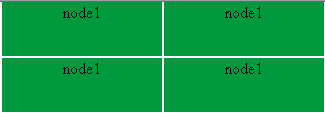
http://<VIP>:9010/safekit/mosaic.html(or use port 9453 if the SafeKit web server and console have been switched to HTTPS), then enter the mirror module name and run the test. → Expected result: all the cells of the mosaic display the name of the primary server, in a single color: all TCP connections to the Virtual IP (VIP) are served by the primary.
4. Test 2 – Manual failover (stop of the primary)
This test checks that the Virtual IP (VIP) follows the primary server during a failover, triggered by stopping the module on the primary.
Steps
- Stop the module on the primary (node 1) from the SafeKit console (or from the command line with
safekit stop -m <module>). → Expected result: node 1 goes to STOP (NotReady) and node 2 goes to ALONE (Ready). In the log of the new primary, the messageVirtual IP <VIP> setappears. - On the new primary, run
ipconfigorip addr show. → Expected result: the Virtual IP (VIP) now appears as an alias on this node, and no longer on the former primary. - From the client workstation, repeat the three
pingcommands and run the mosaic again on the Virtual IP (VIP). → Expected result: everything responds, and all the cells of the mosaic now display the name of the new primary, in a single color. - Restart the module on node 1: it resynchronizes and goes to SECOND (Ready), while node 2 goes to PRIM (Ready).
5. Test 3 – Checking MAC rerouting with arp -a
You note the MAC address associated with the Virtual IP (VIP) before the failover, then check that it has changed afterwards.
This test is only possible if the client workstation is in the same IP subnet as the cluster.
If there is a router between the client and the cluster, the client’s ARP table does not contain the Virtual IP (VIP), but the address of the gateway used to reach the cluster’s network. In that case, check the ARP table of the router or gateway with the network team.
Steps
- The module is PRIM (Ready) on node 1 and SECOND (Ready) on node 2.
- On the client workstation,
pingboth physical IP addresses and the Virtual IP (VIP), then runarp -a. → Expected result: the Virtual IP (VIP) is associated with the same MAC address as the physical IP address of the primary. stopthe module on the primary (node 1).pingthe Virtual IP (VIP) again, then runarp -aagain. → Expected result: the Virtual IP (VIP) is now associated with the same MAC address as the physical IP address of the new primary.
pingthe Virtual IP (VIP) again before reading the ARP table: the entry may be marked as stale and only refreshed after aping.
Example of the expected ARP table, before and after the primary is stopped:
| Address | MAC before the stop | MAC after the stop |
|---|---|---|
| Physical IP of node 1 | Node 1 MAC | Node 1 MAC |
| Physical IP of node 2 | Node 2 MAC | Node 2 MAC |
| Virtual IP (VIP) | Node 1 MAC | Node 2 MAC |
6. Test 4 – End-to-end check with Wireshark (Windows) or tcpdump (Linux)
You can follow a TCP connection to the Virtual IP (VIP) by capturing packets on the client and on both nodes: with Wireshark on Windows machines, and with tcpdump on Linux machines.
You must look at the MAC (Ethernet) headers of the packets: the destination IP address remains the Virtual IP (VIP), and it is the destination MAC address that shows which node receives the traffic.
What you should observe:
| When | Where to capture packets | Observed MAC addresses |
|---|---|---|
| Before the failover | client | Client MAC → MAC of node 1 (primary) |
| Before the failover | node 1 | Packets to the Virtual IP (VIP) are received; node 2 receives nothing |
| During the failover | network | MAC rerouting messages sent by node 2 for the Virtual IP (VIP): messages sent by the OS when it is set as an alias, and GARPs sent by SafeKit (arpreroute="on") |
| After the failover | client | Client MAC → MAC of node 2 (new primary) |
If the client workstation is in a different subnet from the cluster, the “client MAC” seen on the nodes is the MAC address of the gateway (router) connecting the two subnets, not that of the client workstation.
7. Which workstations to test from
The behavior depends on the network path between the client and the cluster. Run tests 1 and 2 from each type of client relevant to your architecture:
| Client location | What the test checks |
|---|---|
| Client in the same subnet as the cluster | Update of the clients’ ARP tables (test 3 possible) |
| Client in a different subnet (router, gateway, hypervisor virtual network) | Update of the clients’ ARP tables in the router or gateway |
| Client VM on a hypervisor that also hosts one VM of the mirror cluster | Behavior of the hypervisor’s virtual switch, which also handles internal switching and routing |
8. Summary of expected results
| Test | Action | Expected result |
|---|---|---|
| 1 | PRIM / SECOND, ipconfig, ping and mosaic | Virtual IP (VIP) as an alias on the primary only; the 3 ping commands respond (unless filtered by firewalls); the mosaic displays only the primary |
| 2 | Stop of the primary | Virtual IP (VIP) as an alias on the new primary; Virtual IP <VIP> set message; the mosaic displays only the new primary |
| 3 | arp -a before and after the primary is stopped | Virtual IP (VIP) moves from the MAC address of node 1 to that of node 2 |
| 4 | Wireshark or tcpdump capture before and after the failover | The client sends to the MAC address of the new primary |
9. Troubleshooting
- The Virtual IP (VIP) no longer responds after the failover: MAC rerouting messages are not taken into account by a device on the path (router, gateway, virtual switch), which keeps sending traffic to the MAC address of the former primary. Check the handling of MAC rerouting messages with your network team.
- Sending GARPs: the
arpreroute="on"attribute of the<vip>section (witharpintervalandarpelapse) sends GARPs regularly on the Virtual IP (VIP) after the failover. See the User’s Guide, section 13.6.4 “<vip>syntax”. - Diagnosing Virtual IP (VIP) ↔ MAC resolution: see the User’s Guide, section 7.24 “Troubleshooting Virtual IP (VIP) ↔ MAC resolution”, and section 7.16 “Problem with the virtual IP after failover”.
For more information:
- How a virtual IP address works in high availability clustering?
- For load balancing with a virtual IP address, see Testing the load balancing virtual IP address in a SafeKit Farm cluster.