---
title: "K3S High Availability with SafeKit: Install the k3s.safe Module for Failover"
canonical: "https://safekit.eviden.com/quick-install/safekit-quick-installation-guide-with-kubernetes/"
description: "Deploy the k3s.safe module for SafeKit to enable synchronous real-time replication and automatic failover of Kubernetes on Linux. This guide walks you through setting up a 2-node SANless cluster for critical Linux applications without shared storage."
category: "quick-install"
lang: "en"
topics: "High Availability Quick Installation Guide for Kubernetes, SafeKit High Availability Limitations, Overview of the SafeKit / Kubernetes solution, Installation and configuration of the SafeKit / Kubernetes solution on Linux (k3s.safe), What are the different scenarios in case of network isolation in a cluster?, Demonstration of the SafeKit mirror solution"
---
# K3S High Availability with SafeKit: Install the k3s.safe Module for Failover
## High Availability Quick Installation Guide for Kubernetes {#quick-guide}
This guide explains how to set up a **mirror cluster** for Kubernetes using SafeKit, ensuring automatic failover and synchronous replication without the need for shared storage.
For help, you can use [SafeKit AI 🤖](https://safekit.eviden.com/resources/safekit-support/).
### 1. Overview
* **Architecture:** Uses a two-node system (Primary/Secondary).
* **Data Protection:** Implements real-time synchronous replication for **zero data loss** (RPO=0).
### 2. Installation
* **Software:** Install the SafeKit engine on both servers.
* **Module:** Download the pre-configured `k3s.safe` application module.
### 3. Configuration
* **Web Console:** Configure the specific folders containing the Kubernetes files.
* **Monitoring:** Start monitoring and protecting the Kubernetes application.
## SafeKit High Availability Limitations {#safekit-ha-limitations}
Limit / Requirement | Reason & Impact | Recommended Alternative
---|---|---
Replication size: A few TBs | Resynchronization time after failure ([step 3](https://safekit.eviden.com/architectures/file-replication-byte-level-with-failover-mirror-cluster/#safekit-mirror-cluster)):
• 1 Gb/s network ≈ 3 hours / TB
• 10 Gb/s network ≈ 1 hour / TB (depending on disk write performances) | • Use [external shared storage](https://safekit.eviden.com/best-practises/san-vs-nas-shared-storage-for-a-failover-cluster/) (more expensive, more complex).
File count: < 1,000,000 files | • Resynchronization time performance after a failure ([step 3](https://safekit.eviden.com/architectures/file-replication-byte-level-with-failover-mirror-cluster/#safekit-mirror-cluster)).
• Time to check each file between both nodes. | • Put the many files to replicate in a virtual hard disk / virtual machine.
• Only the files representing the virtual hard disk / virtual machine will be replicated and resynchronized in this case.
Failover capacity: ≤ 32 VMs | • Each VM runs in an independent mirror module.
• Maximum of 32 mirror modules running on the same cluster. | • Use an external shared storage and another VM clustering solution (more expensive, more complex).
Network architecture: LAN/VLAN network between remote sites | • Automatic failover of the [virtual IP address](https://safekit.eviden.com/best-practises/how-a-virtual-ip-address-works/) with 2 nodes in the same subnet.
• Good bandwidth for resynchronization ([step 3](https://safekit.eviden.com/architectures/file-replication-byte-level-with-failover-mirror-cluster/#safekit-mirror-cluster)) and good latency for [synchronous replication](https://safekit.eviden.com/best-practises/synchronous-replication-vs-asynchronous-replication/) (typically a round-trip of less than 2ms). | • Use a [load balancer for the virtual IP address](https://safekit.eviden.com/best-practises/how-a-virtual-ip-address-works/) if the 2 nodes are in 2 subnets (supported by SafeKit, especially in the cloud).
• Use backup solutions with asynchronous replication for high latency network.
## Overview of the SafeKit / Kubernetes solution
The solution is described here: **💡[Kubernetes K3s High Availability: 2-Node Synchronous Replication & Failover]()**
## Installation and configuration of the SafeKit / Kubernetes solution on Linux (k3s.safe)
### 1. Download packages
* Download the free version of SafeKit 8.2 on Linux (safekitlinux_xx.bin)
* Download the k3s.safe Linux module
* Download the k3sconfig.sh script
* Documentation (pptx)
Note: the k3sconfig.sh script installs K3S, MariaDB, NFS, SafeKit on 2 Linux Ubuntu 24.04 nodes.
[ Download SafeKit (Linux) > ]()
Download k3s.safe (Linux) >
[ Download k3sconfig.sh > ]()
[ Documentation (pdf) > ]()
### 2. First on both nodes
On 2 Linux Ubuntu 24.04 nodes, as root:
* Make sure the node has internet access (could be through a proxy)
* Copy k3sconfig.sh, k3s.safe and the safekit_xx.bin package into a directory and cd into it
* Rename the .bin file as "safekit.bin"
* Make sure k3sconfig.sh and safekit.bin are executable.
* Edit the k3sconfig.sh script and customize the environment variables according to your environment (including a virtual IP)
* Execute on both nodes: `./k3sconfig.sh prereq`
The script will:
* Install required debian packages: alien, nfs-kernel-server, nfs-common, mariadb-server
* Secure mariadb installation
* Create directories for file replication
* Prepare the NFS server for sharing replicated directories
* Install SafeKit
### 3. On the first node
Execute on the first node: `./k3sconfig.sh first`
The script will:
* Create the K3S configuration database and the k3s user
* Create the replicated storage volume file (sparse file) and format it as an xfs filesystem
* Create the safekit cluster configuration and apply it
* Install and configure the k3s.safe module on the cluster
* Start the k3s module as "prim" on the first node
* Download, install and start k3s
* Download and install nfs-subdir-external-provisioner Helm chart
* Display K3S token (to be used during second node installation phase)
### 4. On the second node
Execute on the second node: `./k3sconfig.sh second `
* is the string displayed at the end of the "k3sconfig.sh first" execution on the first node
The script will:
* Make sure the k3s module is started as prim on the first node
* Install k3s on the second node
* Start the k3s module
### 5. Check that the k3s SafeKit module is running on both nodes
Check with this command on both nodes: `/opt/safekit/safekit –H "*" state`
The reply should be similar to the image.
/opt/safekit/safekit –H "*" state
---------------- Server=http://10.0.0.20:9010 ----------------
admin action=exec
--------------------- k3s State ---------------------
Local (127.0.0.1) : PRIM (Service : Available)(Color : Green)
Success
---------------- Server=http://10.0.0.21:9010 ----------------
admin action=exec
--------------------- k3s State ---------------------
Local (127.0.0.1) : SECOND (Service : Available)(Color : Green)
Success
### 6. Start the SafeKit web console to administer the cluster
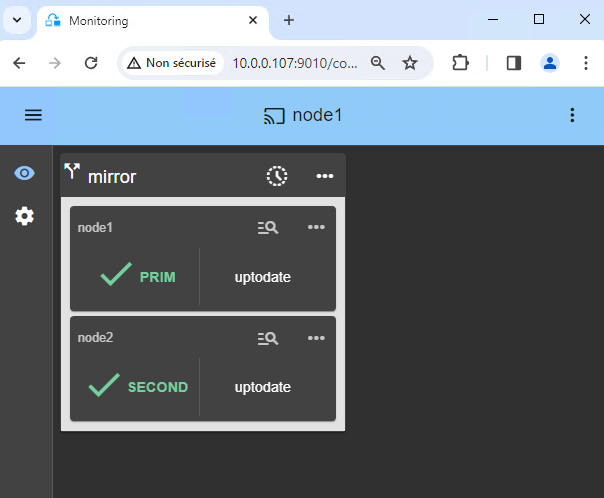
* Connect a browser to the SafeKit web console url `http://server0-IP:9010`.
* You should see a page similar to the image.
* Check with Linux command lines that K3S is started on both nodes (started in `start_prim` and `start_second`) and that MariaDB is started on the primary node (started in `start_prim`).
### 7. Testing
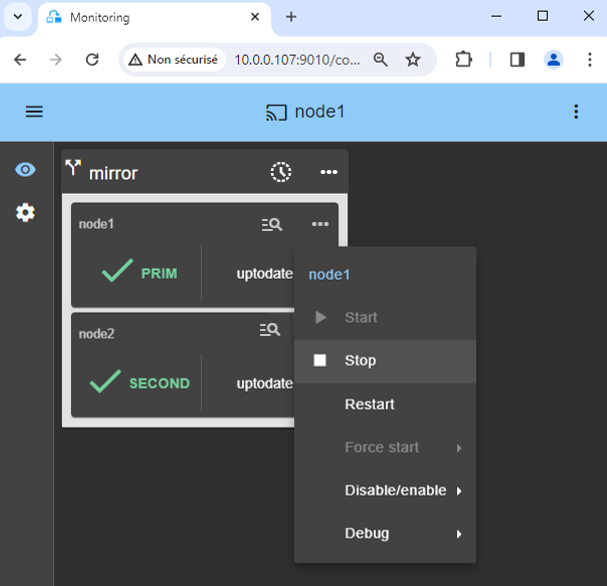
* Stop the PRIM node by scrolling down its contextual menu and clicking `Stop`.
* Verify that there is a failover on the SECOND node which should become ALONE (green).
* And with command lines on Linux, check the failover of services (stopped on node 1 in the `stop_prim` script and started on node 2 in the `start_prim` script). MariaDB and K3S should run on node2.

If ALONE (green) is not reached on node2, analyze why with the module log of node 2.
* click on `node2` to display the module log.
* [example of a SQL Server module log]() where the service name in `start_prim` is invalid. The sqlserver.exe process is monitored but as it is not started, at the end the module stops.

If everything is okay, initiate a start on node1, which will resynchronize the replicated directories from node2.
If things go wrong, stop node2 and [force the start as primary]() of node1, which will restart with its locally healthy data at the time of the stop.

🛠️ [More information on tests in the User's Guide.]()
### 8. Try the cluster with a Kubernetes application like WordPress
You have the example of a WordPress installation in the image: a web portal with a backend database implemented by pods.
You can deploy your own application in the same way.
WordPress is automatically highly available:
* with its data (php + database) in persistent volumes replicated in real-time by SafeKit
* with a virtual IP address to access the WordPress site for users
* with automatic failover and automatic failback
Notes:
* The WordPress chart defines a load balanced service that listens on and ports.
* WordPress is accessible through the url: `http://:.`
* The virtual IP is managed by SafeKit and automatically switched in case of failover.
* By default, K3S implements load balancers with Klipper.
* Klipper listens on : and routes the TCP/IP packets to the IP address and port of the WordPress pod that it has selected.
$ export KUBECONFIG=/etc/rancher/k3s/k3s.yaml
$ helm repo add bitnami https://charts.bitnami.com/bitnami
$ helm install my-release bitnami/wordpress --set global.storageClass=nfs-client --set service.ports.http=8099,service.ports.https=4439
The previous helm command should download the WordPress image from `registry-1.docker.io`. You may encounter authentication issues on `registry-1.docker.io`. In this case, you should:
* create `/etc/rancher/k3s/registries.yaml` on both nodes with inside:
configs:
"registry-1.docker.io":
auth:
username: your_user_name
password: your_password
tls:
insecure_skip_verify: true
* stop and start k3s to take it into account, with `systemctl stop k3s` and `systemctl start k3s`.
* Execute `helm registry login -u your_user_name docker.io`, then enter your password
### 9. Support
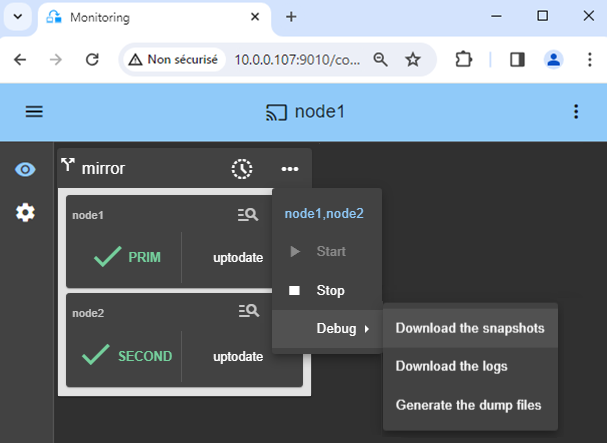
* For getting support, take 2 SafeKit `Snapshots` (2 .zip files), one for each node.

🛠️ [Troubleshooting in the User's Guide.]()
### 10. If necessary, configure a splitbrain checker
* See below ["What are the different scenarios in case of network isolation in a cluster?"](#isolation) to know if you need to configure a splitbrain checker.
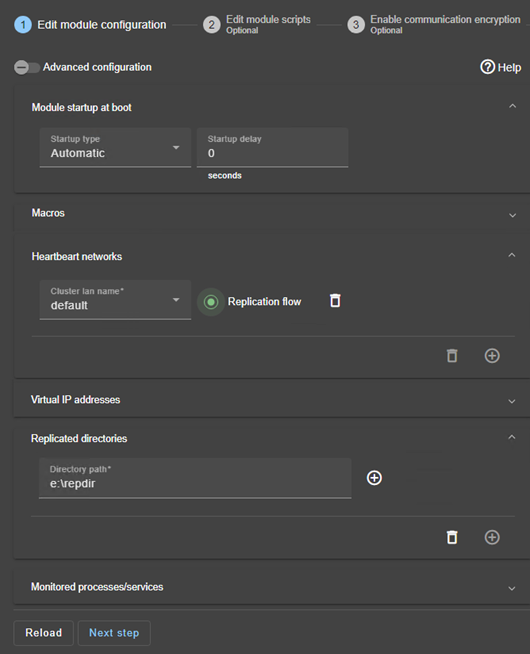
* In the module configuration, click on `Advanced Configuration` (see image) to edit `userconfig.xml`.
* Declare the splitbrain checker by adding in the `` section of `userconfig.xml`:
...
...
* `Save and apply` the new configuration to redeploy the modified userconfig.xml file on both nodes (module must be stopped on both nodes to save and apply).
**Parameters** :
* `ident="witness"` identifies the witness with a resource name: `splitbrain.witness`. You can change this value to identify the witness.
* `exec="ping"` references the ping code to execute. Do not change this value.
* `arg="witness IP"` is an argument for the ping. Change this value with the IP of the witness (a robust element, typically a router).
## What are the different scenarios in case of network isolation in a cluster? {#isolation}
### A single network
When there is a network isolation, the default behavior is:
* as heartbeats are lost for each node, each node goes to ALONE and runs the application with its virtual IP address (double execution of the application modifying its local data),
* when the isolation is repaired, one ALONE node is forced to stop and to resynchronize its data from the other node,
* at the end the cluster is PRIM-SECOND (or SECOND-PRIM according the duplicate virtual IP address detection made by Windows).
### Two networks with a dedicated replication network
When there is a network isolation, the behavior with a dedicated replication network is:
* a dedicated replication network is implemented on a private network,
* heartbeats on the production network are lost (isolated network),
* heartbeats on the replication network are working (not isolated network),
* the cluster stays in PRIM/SECOND state.
### A single network and a splitbrain checker
When there is a network isolation, the behavior with a split-brain checker is:
* a split-brain checker has been configured with the IP address of a witness (typically a router),
* the split-brain checker operates when a server goes from PRIM to ALONE or from SECOND to ALONE,
* in case of network isolation, before going to ALONE, both nodes test the IP address,
* the node which can access the IP address goes to ALONE, the other one goes to WAIT,
* when the isolation is repaired, the WAIT node resynchronizes its data and becomes SECOND.
Note: If the witness is down or disconnected, both nodes go to WAIT and the application is no more running. That's why you must choose a robust witness like a router.
## Demonstration of the SafeKit mirror solution
### SafeKit Video: Application-Level Clustering (8:47) {#demo-mirror-ha-cluster}
In this video, discover how SafeKit implements a **mirror HA cluster** without the complexity of a SAN. While this demonstration uses Microsoft SQL Server, the solution works identically for other databases and applications.
### Chapters
1. 🎬 [2 nodes with SQL Server](https://youtu.be/mGwEguDnnH0?t=0s) (0:32)
2. 🎬 [Configure the cluster and the mirror.safe module](https://youtu.be/mGwEguDnnH0?t=32s) (3:58)
3. 🎬 [Start and test SQL replication, migration, failover on crash](https://youtu.be/mGwEguDnnH0?t=270s) (4:17)
### Step-by-Step Implementation
* 🛠️ [Read the guide on setting up a mirrored cluster on Windows](https://safekit.eviden.com/quick-install/safekit-quick-installation-guide-for-a-new-windows-application-with-real-time-replication-and-failover/)
* 🛠️ [Read the guide on setting up a mirrored cluster on Linux](https://safekit.eviden.com/quick-install/safekit-quick-installation-guide-for-a-new-linux-application-with-real-time-replication-and-failover/)